
 Help & Support


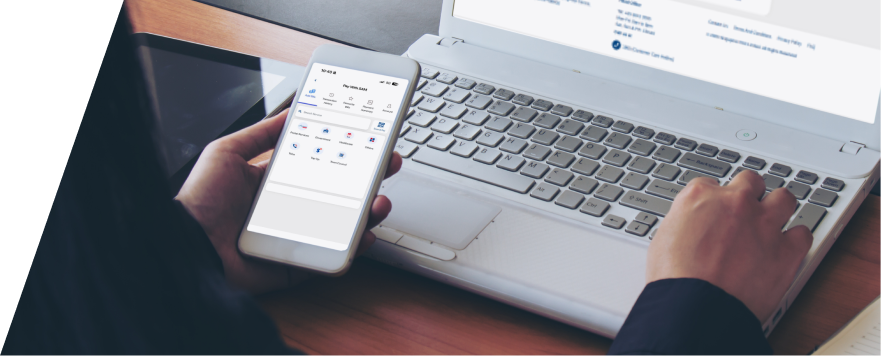
Payment for Singapore Duty & GST
When you buy an item from overseas, it's important to be aware that it may incur Goods and Services Tax (GST) and duty as per Singapore customs regulations. For packages sent via SingPost, you can conveniently pay any applicable GST and/or duty using the SingPost app, at a POPDrop, Self-Service Kiosk, or at any post office counter. Once you’ve settled these payments, your package will be delivered to you. This process ensures that receiving your international purchases is simple and hassle-free.
How to Make Digital Payment
1
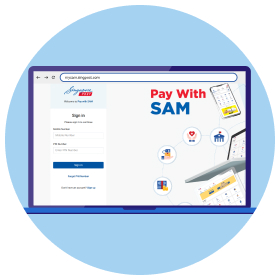
Visit SingPost Pay With SAM.
Note: First-time users can register using a Singapore Mobile number
2
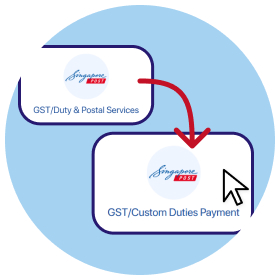
Select GST/Duty & Postal Services > GST/ Custom Duties Payment
3
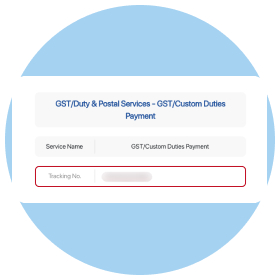
Enter your tracking number to check the GST/Duty amount due. Complete your payment via Credit/Debit Card or eNETS.
Payment methods
Important Notes:
- SingPost collects the applicable duty and/or GST for goods imported by customers, on behalf of Singapore Customs. All dutiable items will be delivered once the necessary documents and payments are received. All duty and GST must be paid in full prior to delivery.
- To verify the authenticity of your shipment, customers should view the tracking status of the item using the Tracking Number provided.
- Customers without a registered account on SingPost App will be notified via email/letter.
- If the applicable duty and/or GST is not paid by the due date, SingPost will return the item(s) to the sender.
- If the applicable duty and/or GST had been paid via Customs permit, please send the payment details via email to oclgst@singpost.com.
- For more information, please refer to our FAQ below.
Frequently asked questions
Please complete your GST or custom duty payment by the due date indicated on your notice to prevent your parcel from being returned to the sender.
Once your payment is confirmed, your parcel will be cleared and delivered within 3 working days.
Option 1: Pay Online via Pay With SAM or SingPost Mobile App
You can make an instant digital payment using a Credit/Debit Card or eNETS through either of these digital channels:
• Via Mobile App: Open the SingPost Mobile App and select Pay with SAM.
• Via Web: Visit SingPost Pay With SAM. (First-time users will need to register using a Singapore mobile number).
Once in Pay with SAM, follow these steps:
1. Select GST/Duty & Postal Services > GST/ Custom Duties Payment.
2. Enter your Tracking Number to check the GST/Duty amount due.
3. Complete your payment via Credit/Debit Card or eNETS.
Option 2: Pay via POPDrop & Self-Service Kiosks
You can complete your payment at any islandwide POPDrop kiosk or Self-Service Kiosk:
1. Tap Pay Bills on the kiosk screen.
2. Select GST/Duty & Postal Services > GST/Duty & Postal Services.
3. Enter your Tracking Number to check the amount due.
4. Complete your payment using the supported digital payment modes on-screen (e.g., NETS, Credit/Debit Card).
Option 3: Pay Over the Counter
Visit any Post Office islandwide with your tracking number or notification letter to complete payment directly with counter staff. You can use our Locate Us to find the nearest Post Office near you.
Your item is on hold pending your payment of Goods and Services Tax (GST) and/or duty. Please note that your postal parcel may be held by ICA/SingPost for the following reasons:
- the postal parcel contains dutiable goods;
- the postal parcel contains controlled goods;
- the postal parcel contains prohibited goods; and/or
- the postal parcel contains goods of a total CIF value exceeding S$400 and does not have an invoice attached to it at the time of arrival.
In the event that your postal parcel has been held by ICA/SingPost, you will receive a notification letter from SingPost which will advise you on the follow-up action required.
SingPost will notify you once the GST and/or Duties have been computed. You will receive notification via:
- SingPost Mobile App: A push notification (for registered users).
- SMS / Email: If your contact details had been provided by the sender.
- Notification Letter: A physical letter sent to your delivery address if no digital contact info is available.
You must make payment within 14 days of the notification date. If no action is taken, the item will be returned to the sender.
Kindly note: If your tracking status shows "On Hold" but you have not received any notification or letter after 3 working days, please contact us.
Once payment is confirmed, your item will typically be delivered within the next 2-3 working days.
If you have imported via ordinary mail or Speedpost and overpaid GST, for example due to various reasons including incorrectly declared values or short shipped items, etc, you may apply for a refund through SingPost.
Your refund claim should be supported by the following supporting documents (where applicable):
- Copy of GST/duty payment receipt
- Commercial invoice
- Consignment/dispatch note for the imported goods
- Export and refund document for returned faulty goods (for example, shipment advice, seller’s credit note, etc)
- Documentary evidence showing that the money paid for the returned goods was credited back to the buyer
- Any other documents to support the claim for refund (for example, Customs In-Non-Payment (GST Relief) permit, etc)
Goods that are imported into Singapore by parcel post through ordinary mail or Speedpost (e.g. for goods that are purchased online) are subject to GST. This applies to all new articles, personal articles, souvenirs, gifts, food preparations and dutiable products.